
Running and maintaining a successful WordPress website isn’t a simple one-time task. Plugins, themes, and the very nature of ecommerce, as well as lead generation, are always in flux, and you need to keep an eye on all of these changes if you want your website to excel. If your business is relying on customers adding to cart and checking out or filling out a form and suddenly conversions dry up, that could point to a broken site. So, no matter if you own a lead gen or ecommerce site, WordPress website maintenance is a necessity.
We’ve built the ultimate checklist to help you track everything you need to do when maintaining your WordPress website, including key pointers on optimizing security, performance, and usability.
The Checklist
1. Create Backups
Backups are the cornerstone of WordPress website maintenance, providing a safety net in case of unexpected data loss or website issues. Ideally, creating a backup should be the first step in your WordPress maintenance plan. Regular backups ensure you can restore your website to a previous state, minimizing downtime and potential data loss.
Don’t just rely on local backups either. Store your backups offsite, preferably in a secure cloud storage solution. Cloud storage protects your data from issues like hardware failure or natural disasters. Consider using a service like Amazon S3 or Google Cloud, which offers robust offsite backup features.
Simply creating a backup isn’t good enough, according to any trusted WordPress maintenance checklist. Remember to regularly test your backups in a staging environment to ensure their functionality and accuracy.
2. Stay Updated
Windows updates (for non-commercial PCs) are notoriously annoying. WordPress updates, however, are as crucial as it gets. As part of our WordPress maintenance plan, we recommend keeping your WordPress core, themes, and plugins updated whenever possible. These updates generally improve key aspects of your website, like security and performance.
3. Secure Your Website
A secure website is a prerequisite for any business that wants to protect its data, customer trust, and its own reputation. Slacking on this front opens your business up to data theft and massive financial losses down the line.
While keeping your WordPress core, themes, and plugins updated is important, it’s just not enough. Additional security measures are necessary to create a robust defense against threats. Make sure your WordPress maintenance plan includes these pointers:
- Two-Factor Authentication (2FA): Only about 45% of internet users have activated two-factor authentication on at least one account. Enabling 2FA should absolutely be a part of your WordPress maintenance checklist if you haven’t already, as it can serve as an extra layer of defense against threats.
- Security Plugins: Consider investing in a trusted WordPress security plugin like Wordfence or Jetpack. Security plugins can help you automate the lion’s share of security maintenance, including setting up 2FA. Other features like malware scanners can also come in handy here, especially if you’re not particularly tech-savvy.
4. Optimize Performance
Users are at least 32% more likely to click off your page if it takes longer than 1 second to load. This step of our WordPress maintenance plan ensures that doesn’t happen. In fact, performance optimization is crucial for ensuring better search engine rankings and building a better overall user experience. This aspect of website management includes several steps–here are the highlights:
- Images: Images that are unnecessarily large in file size or resolution are often the biggest culprit behind slow loading times. Optimizing your images involves reducing their file sizes without compromising on quality. This can be achieved by using image compression tools and plugins, choosing appropriate image formats like WebP, and resizing images when required.
- Caching: This step in our WordPress maintenance checklist essentially involves storing copies of your website on a remote server, so that it can quickly be delivered to visitors when necessary. Caching reduces the overall workload on your server, and it’s great for storefronts that work with tons of high-res assets. If you’re executing a WordPress maintenance plan yourself and you’re not sure where to start with caching, plugins like WP Super Cache can help.
- Database: A cluttered database can slow down your website. Regularly cleaning up your database by removing unnecessary data, optimizing tables, and using database optimization plugins can improve its performance.
5. Check for Broken Links
A broken link can be a source of frustration for new visitors, effectively ruining a great first impression. Broken links also signal to search engines that your website is poorly maintained and can even lower your search engine ranking.
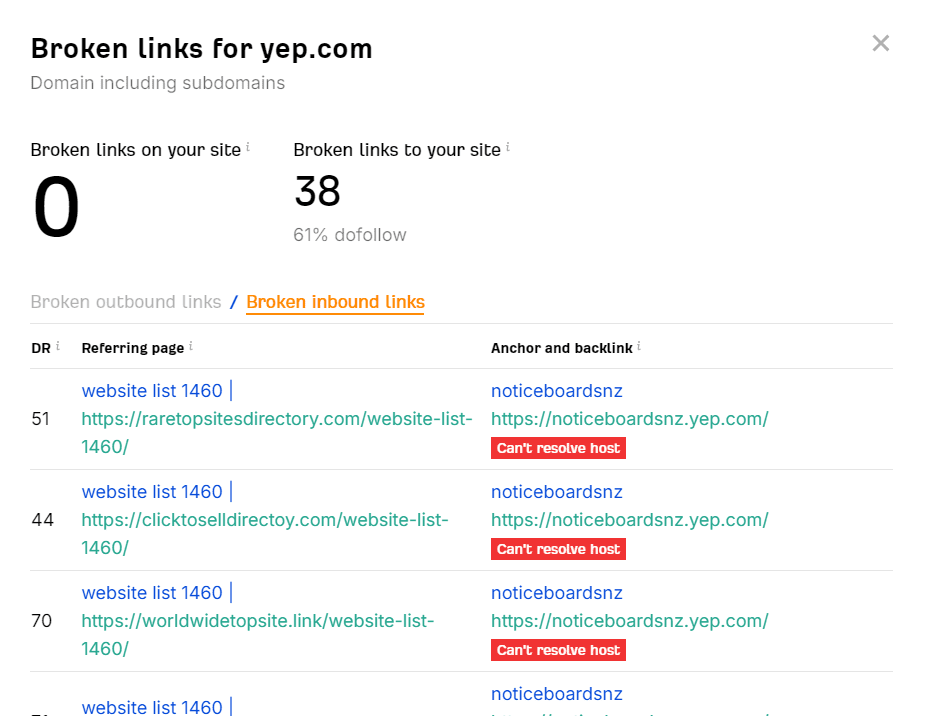
Use resources like Ahrefs’ Broken Link Checker to find those broken links before your visitors do. You can fix these links by either redirecting them to the correct page or replacing them with a more relevant URL.
6. Perform an SEO Audit
A thorough SEO audit should be a part of any WordPress maintenance plan, and it’s essential for identifying areas of improvement and optimizing your website for search engines. As part of your WordPress maintenance checklist, an audit involves systematically going through every facet of your website to identify issues that might be damaging its rankings. This includes:
- Content Audits: Evaluate the quality and relevance of your content, identify new opportunities, and update outdated or irrelevant content.
- Technical SEO: Study your website’s technical infrastructure to ensure it’s well-optimized. This includes testing for mobile-friendliness and indexing errors. Users are 5x more likely to leave a website that isn’t optimized for mobile, so you’ll want to ensure your website loads perfectly across multiple devices.
- Keyword Research: This step of our WordPress maintenance plan will show you how your target audience is searching for your products, and it can reveal all new opportunities for content to improve your ranking.
Are outdated plugins and slow load times hurting your site?
7. Rely on Website Analytics
Tools like Google Analytics provide priceless insights into how visitors interact with your WordPress website. You can track metrics like geographical location, traffic volume, and session duration to understand your audience and discover better ways to engage them.
You can also use analytics tools like Google Search Console to improve your website’s security and overall performance. For instance, if you’ve set up GSC (Google Search Console) as part of your regular WordPress maintenance checklist, it can alert you about potential issues so that they can be promptly addressed and resolved.
8. Review Your Hosting Solution
Closely following a WordPress maintenance plan will only do so much if your website is being bottlenecked by your hosting provider. It’s possible you may have hit your hosting plan’s limits while growing your website.
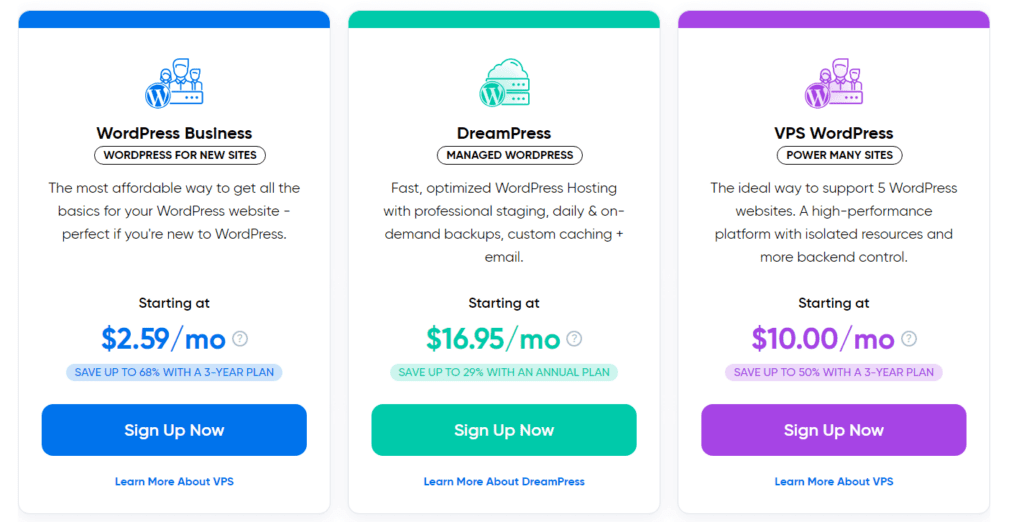
If that’s the case, it’s time to review your plan! Assess your budget and evaluate the hosting options on the market to find something that works for your current (and planned) scale. Working with a digital marketing agency like Coalition Technologies who is partnered with hosting providers can often help secure you a discount on hosting plans as well.
9. Delete Redundant Plugins
WordPress offers thousands of powerful plugins that all promise the world, and the temptation is usually too strong to resist. You might have accumulated a bunch of plugins that are now either inactive or simply redundant. Your WordPress maintenance plan should include a routine check for these plugins, as they can needlessly hog resources and slow your website down.
10. Check for Spam
The rise of botting has turned comment sections into digital graveyards, and site managers often overlook this element when going through their WordPress maintenance checklists. If your website has any comment sections, check them for possible spam.
These comments can direct users to competitor websites and even steal their data with phishing links. If a visitor has a negative experience because of this, they’ll associate your brand with it. Plugins can help you automate this step if your website has many open comment sections.
Grow Your WordPress Website
A successful WordPress maintenance plan doesn’t have to be complex. If you plan on maintaining your website yourself, remember that the ideal checklist should be simple and easy to execute routinely.
If you’re not well-versed in the more technical aspects of WordPress, why not let a top-rated digital marketing agency help you out? Coalition Technologies has helped hundreds of WordPress websites achieve their maximum potential with data-driven maintenance plans and digital marketing strategies. Find out what our experts can do for your website with a free consultation, contact us today!
Frequently Asked Questions (FAQs)
What do WordPress maintenance plans include?
A maintenance plan will generally include core services geared toward keeping your website secure, updated, and fast. Common examples include:
- Backup creation and maintenance
- SEO optimization
- Security scanning and monitoring
- Performance optimization (across multiple devices)
- Core/plugin/theme updates
Can I maintain my WordPress website myself?
Absolutely. A WordPress maintenance checklist can help you keep track of everything you need to do to keep your website in top shape. That said, performing these routine tasks can be incredibly time-consuming for an individual.
We recommend working with a professional web design agency to perform WordPress maintenance. Agencies like Coalition Technologies often offer WordPress maintenance plans, and investing in one gives you the peace of mind of knowing your website is in capable hands.
Is WordPress maintenance expensive?
WordPress maintenance is as expensive as you need it to be. If you maintain your website yourself, your only expenditures will be on cloud storage fees and plugin subscriptions (if any).
Those who choose to purchase a maintenance plan can pick from a wide range of options online. Agencies like Coalition Technologies will generally offer multiple WordPress maintenance plan packages, and you can pick what works for you. If you’re looking for a more personalized solution, we recommend reaching out to us for a custom package.
Can WordPress maintenance increase my web traffic and engagement?
Following a WordPress maintenance checklist can indirectly improve traffic and engagement since timely maintenance contributes to ranking factors like performance, security, and UX. For instance, a well-maintained website with optimized images and proper caching can significantly boost page load speeds, leading to a better user experience and a higher likelihood of visitors staying on your site.