Shopify is one of the biggest ecommerce platforms in the world. Fittingly, the platform also features an arsenal of powerful tools to help merchants take full advantage of its capabilities. If you know what you’re doing, built-in Shopify SEO tools can propel your store to the top of the results pages. To help you out, we built this comprehensive guide to Shopify’s SEO features and how to use them properly.

Table of Contents
Built-In Features: Why They Matter
Shopify powers over 2.4 million live stores as of 2024. As you might imagine, standing out in this massive crowd is going to be a challenge for any up-and-coming business. The Shopify features mentioned in this guide make it easier for businesses to tread this crowded marketplace. Here’s how:
- Accessible Competition: Shopify levels the playing field by making SEO accessible even if you don’t have technical knowledge. It’s not the same as staying ahead of the curve with a custom SEO strategy, but it’s definitely a great place to start.
- Better UX: Improved SEO and a better user experience are closely linked. Properly using these built-in tools is essential for a better overall user experience.
- Improved Visibility: Ranking higher in search results means more organic traffic from potential customers actively searching for products or services like yours.
Technical SEO Features
Technical SEO refers to the process of optimizing the more technical aspects of your website so search engines can crawl, index, and understand your content better. Each of these built-in technical Shopify features makes your journey to a top rank that much easier.
- Automatic Sitemaps: XML sitemaps are like a directory for your website, listing all the important pages you want search engines to crawl. Shopify automatically generates and updates an XML sitemap that includes key pages for your products, collections, and blog posts. This ensures search engines can easily find and index your content.
- Mobile Optimization: Mobile-friendliness is a major ranking factor for Google, and a poorly optimized mobile experience can lead to high bounce rates and lower rankings. To counter this, all Shopify themes are automatically optimized for mobile devices, meaning they’ll automatically adapt to fit a user’s screen size.
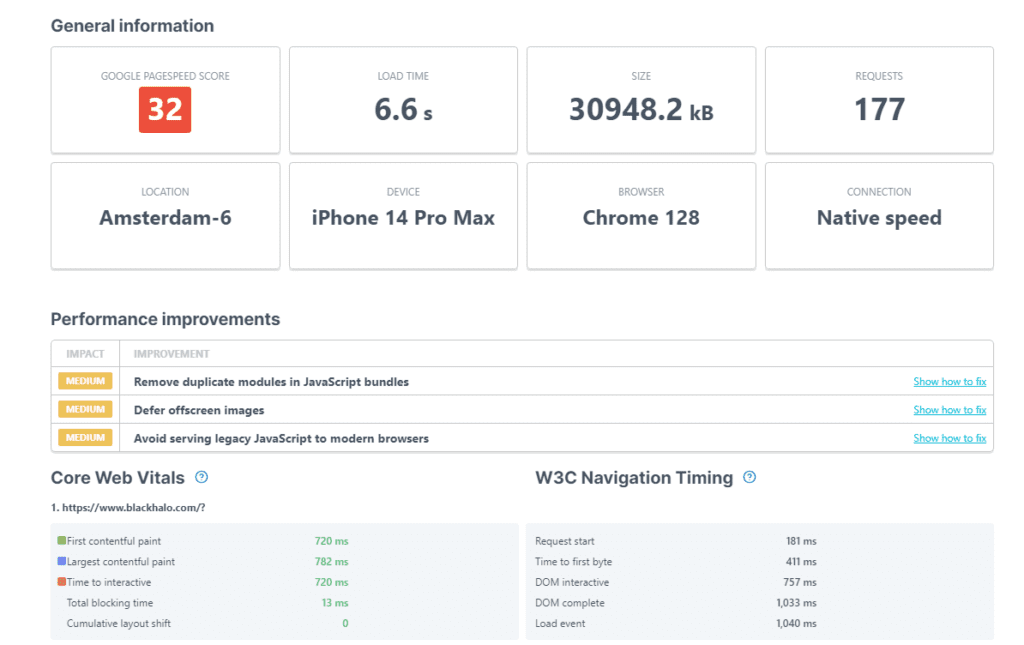
This Shopify feature ensures a more consistent experience for all shoppers without requiring developers to painstakingly optimize your website for every major device.
- URL Structure: A clear URL structure helps users navigate your website by indicating the contents of a page. It also makes it easier for search engines to crawl and index your website. Shopify handles URL structure optimization for you, ensuring your store pages have simple, readable URLs.
Using this Shopify SEO feature, you can also set up 301 redirects within Shopify admin to prevent broken links and avoid losing SEO value when making changes to your pages. If this sounds too complex, you can also use Shopify SEO tools from the app store or contact an ecommerce SEO expert for help.
- Automatic Canonicalization: Canonical tags are a vital Shopify feature. Websites can sometimes have multiple URLs leading to the same content. We frequently see this happen with product pages, for example:
- www.xyz.com/product-1
- www.xyz.com/products/product-1
- www.xyz.com/products/product-1?color=purple
All of these URLs would take shoppers to the same product page. Search engines can consider these URLs as separate pages, potentially leading to duplicate content penalties in the future.
The best way to avoid this is by using canonical tags. These HTML tags specify the preferred version of a webpage, telling search engines to focus on that particular version as the main source. This Shopify feature handles canonical tags automatically. If you’re selling products in multiple variants, like colors or sizes, you won’t have to worry about being penalized for duplicate content.
Product and Collection Page Optimization
Product pages are the heart of any ecommerce store. Shopify’s SEO tools make it easy for merchants to optimize their ecommerce product pages for search engines at a granular level to boost traffic and sales.
- Product titles and descriptions can be edited to be keyword-rich and accurately reflect the product. There’s a careful balance between stuffing your descriptions with keywords and leaving them out entirely in favor of technical specifications.
- Alt-text can be added to every image on your store. This text will be used when your images can’t be rendered for any reason and for ADA compliance. This Shopify feature is important for user accessibility, but it can also be optimized with targeted keywords to help your pages rank higher.
- Meta descriptions are considered an important part of SEO. Great meta descriptions can entice searchers to click on your pages with catchy copy. You can easily edit and keyword-optimize these with Shopify’s SEO features.

- Collection pages are just as customizable. You can give each collection page a descriptive and keyword-optimized name and write engaging descriptions to draw in searchers. We discussed URL structures earlier, and it’s important to note that Shopify’s built-in features allow you to freely modify your collection page URLs. You should edit these to be more readable and SEO-friendly.
Finding The Right Keywords: An Important Note
You’ll notice the term ‘keywords’ keeps popping up constantly in this guide, and there’s a very good reason for that. Finding the right set of keywords is the foundation of any SEO strategy, and they can define the trajectory of your web traffic going forward.
The app store is full of Shopify SEO tools that use AI to suggest page keywords. This might sound convenient, but it’s not perfect. AI-powered tech at the time of writing is prone to hallucinations and errors, and trusting these apps unquestioningly could spell disaster. If you’re unsure how to perform keyword research or use a Shopify feature, we recommend contacting a trusted SEO agency for assistance.
Image Optimization
Image files are responsible for over 46% of the average web page’s size. The larger the page, the slower it will load for your customers. Slow load times are a massive problem for ecommerce stores everywhere. Customers have become accustomed to fast-loading websites, and even a wait time of 2 seconds can be enough to drive a promising lead away.
Shopify does its best to reduce load times by optimizing your images for you. Here’s how:
- Once you’ve uploaded image assets in JPEG or PNG, the built-in Shopify feature will automatically serve them in the WebP format. This format is over 30% leaner than traditional JPEG files without compromising too much on quality.
- Shopify’s SEO features include a free image-resizing tool, letting merchants reduce their file sizes before uploading them.
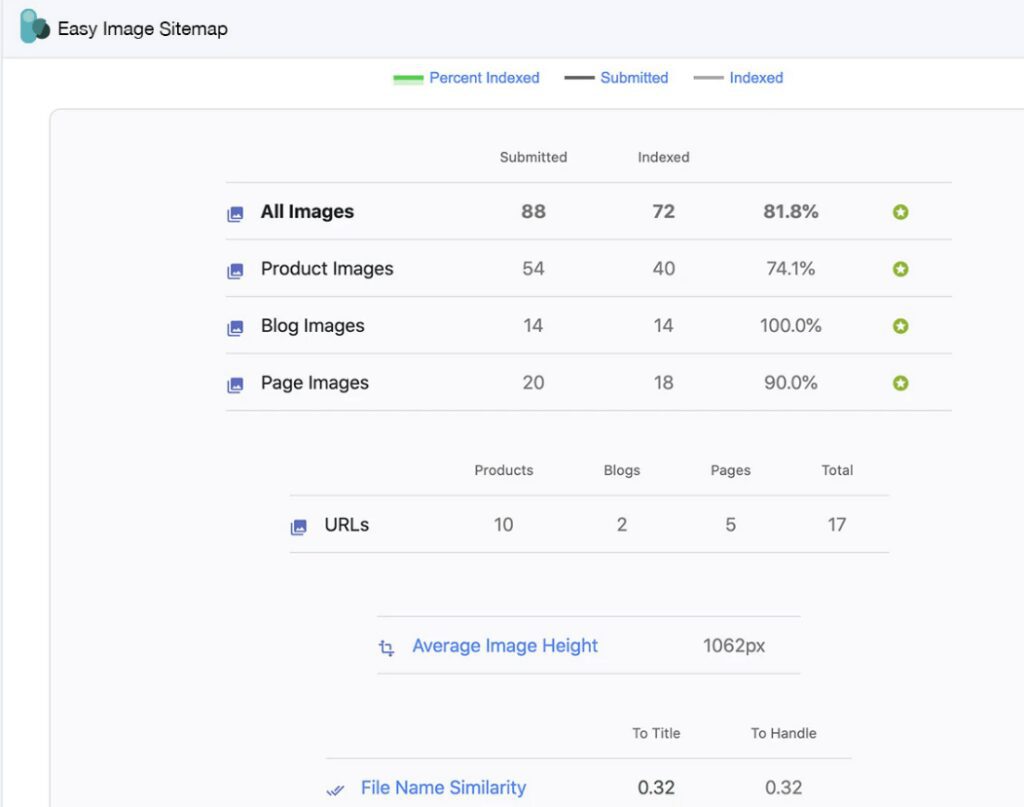
- Search engines don’t just crawl the text on your website; they also go over your images. Adding your images to the sitemap is vital to improve visibility. Some people browse the web exclusively using visual search tools, and adding these images can make indexing much easier. Shopify SEO tools like Easy Image Sitemap can help you automate this process by building sitemaps for all of your product images.
Shopify CDN: A Vital Shopify Feature
Fast load times and a reliable content delivery network (CDN) go hand in hand. A great CDN is crucial for great SEO—albeit indirectly—and Shopify’s CDN is one of the best. A CDN is a distributed network of servers responsible for storing and delivering content like images, videos, and blogs.
Without a reliable CDN, stores have to deal with:
- High bounce rates due to slow load times and lag
- A frustrating and inconsistent user experience
- Frequent (and expensive!) website downtime
These issues can cause your search engine ranking and reputation to plummet. The more robust the CDN, the better the overall user experience.
Shopify works with Cloudflare to deploy cloud servers worldwide. When users access your store, they’ll get serviced by the server closest to their location. This Shopify feature allows merchants to provide a consistent and satisfying experience, regardless of where their customers are. The best part? It’s included free of charge with all Shopify plans.
Built-In vs. Bespoke: Are Shopify’s SEO Features Enough?
As a merchant, having instant access to all these Shopify SEO tools is empowering. You can now jumpstart your growth journey with a Shopify SEO checklist, but there are a few things to consider before you begin:
- Everyone has access to these features. How can your brand make the most of them and stand out?
- Those dissatisfied with the basic built-in Shopify features can turn to the app store, but those recurring subscription fees can stack up deceptively quickly.
- Keeping up with new platform features and search engine algorithm changes simultaneously is incredibly difficult.
This is where custom SEO strategies come in. Built-in features are great for setting up your Shopify store quickly, but they fall flat when it comes to long-term growth. A custom strategy takes your business’s unique goals and limitations into consideration to help you make the most of these Shopify features. If you’re working with a top agency, they can even develop custom tools and integrations to accelerate your journey to the top.
Coalition Technologies is one of those top agencies. As a certified Shopify partner, we’ve helped hundreds of businesses outpace the competition with proven, data-driven SEO strategies while multiplying their sales. Contact us for a free consultation today.
For more info on launching on Shopify, checkout our The Most Comprehensive Shopify Store Setup Guide Ever to kicking off your first store.
*Clicking on our affiliate link above will bring you to the Shopify free trial sign up page.